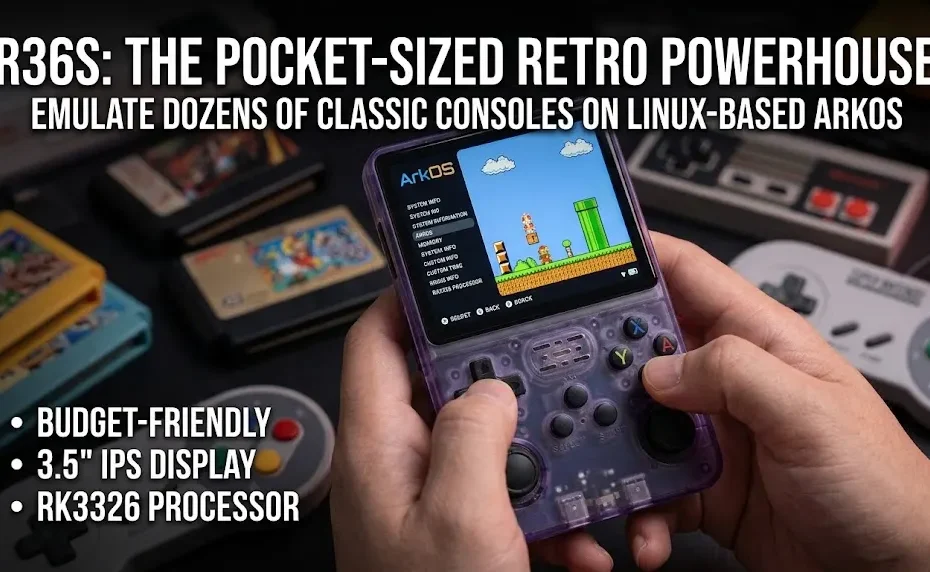
You’ve been there. Staring at a shelf of dusty cartridges or scrolling through emulators on your phone while wishing for something that actually feels like a real handheld. The R36S game console fixes that itch without emptying your wallet.
This vertical, Game Boy-inspired pocket device runs Linux-based ArkOS and emulates dozens of classic systems. It ships ready to play, fits in a jacket pocket, and punches way above its price for 8-bit through PlayStation 1 gaming.
Quick Answer: The R36S game console is a budget-friendly, vertical retro handheld powered by a Rockchip RK3326 chip, 1 GB RAM, and a sharp 3.5-inch 640×480 IPS screen. It runs ArkOS, handles NES to PS1 at full speed, offers dual analog sticks and dual microSD slots, and delivers solid 4–7 hours of battery life. Ideal for players who want authentic portable retro gaming without spending $100+.
Here’s everything you need to know before (and after) you buy one.
1. Core Processor & Memory
| Specification | Details |
|---|---|
| System-on-Chip (SoC) | Rockchip RK3326 |
| CPU | Quad-core ARM Cortex-A35 @ up to 1.5 GHz (64-bit) |
| GPU | ARM Mali-G31 MP2 |
| RAM | 1 GB DDR3L |
| Process Node | 28 nm |
| Operating System | Linux-based (typically ArkOS or community forks such as dArkOSRE) |
Genuine units feature dual physical RAM chips. Some lower-cost clones may ship with reduced memory.
2. Display
| Specification | Details |
|---|---|
| Screen Size | 3.5 inches (diagonal) |
| Panel Type | IPS LCD (often OCA fully laminated) |
| Resolution | 640 × 480 pixels |
| Aspect Ratio | 4:3 (native match for many classic systems) |
| Pixel Density | Approximately 229 PPI |
| Viewing Angles | Wide (typical IPS performance) |
3. Storage, Battery & Ports
| Specification | Details |
|---|---|
| Storage | Dual microSD card slots (one typically for OS / firmware, one for games). Supports cards up to 256 GB or higher depending on firmware and card quality. No internal eMMC storage. |
| Battery Capacity | 3200–3500 mAh Li-ion / Li-polymer (varies by production batch; some units use removable 804066-type cells) |
| Typical Battery Life | Approximately 5–7+ hours on 8-bit / 16-bit / GBA titles; 4–5 hours on PlayStation 1 (depends on brightness, governor settings, and game load) |
| Charging | USB-C (one of the two USB-C ports) |
| Ports | 2 × USB-C (charging + OTG), 3.5 mm headphone jack |
| Wireless | No built-in Wi-Fi or Bluetooth (USB-C OTG dongle required for wireless connectivity) |
4. Controls, Build & Dimensions
| Specification | Details |
|---|---|
| Form Factor | Vertical / pocket-sized (Game Boy-inspired layout) |
| Controls | D-pad, ABXY face buttons, dual analog sticks (clickable), L1 / L2 / R1 / R2 shoulder buttons, Start, Select, FN / Hotkey button |
| Speaker | Single mono speaker (front-facing on most units) |
| Weight | Approximately 185–195 g (including battery) |
| Approximate Dimensions | ~130–155 mm height × 80–85 mm width × 18–22 mm thickness (varies slightly by shell revision) |
| Shell Options | Multiple colorways including solid, translucent, and clear variants |
5. Emulation Performance Ratings
| System Category | Performance Rating |
|---|---|
| 8-bit & 16-bit (NES, SNES, Genesis, GB/GBC/GBA, Neo Geo, most Arcade) |
Full speed, no frameskip required in virtually all titles |
| PlayStation 1 |
Majority of library runs at full speed |
| Nintendo DS |
Most titles playable; dual-screen layout handled well |
| Nintendo 64 / Dreamcast (lighter titles) |
Variable; many games need frameskip or resolution reduction |
| PSP (2D / lighter 3D) |
Playable with compromises; heavy 3D titles limited |
Ratings reflect typical results on genuine RK3326 units running current ArkOS-family firmware under default or lightly tuned settings. Individual game results can vary.
What Exactly Is the R36S Game Console?
The R36S game console is a pocket-sized, vertical retro handheld built for emulating classic video games. Think original Game Boy proportions with modern IPS screen, dual analog sticks, and a Linux operating system (usually ArkOS or community forks like dArkOSRE).
It first gained traction around late 2023 and remains one of the strongest value options in 2026. Most units use a Rockchip RK3326 quad-core Cortex-A35 processor paired with a Mali-G31 GPU and 1 GB of RAM. Storage relies entirely on microSD cards — one slot for the OS and one for games in dual-card setups.
Key Takeaway:
- Vertical “Game Boy” form factor with dual sticks
- Linux-based (ArkOS family) for easy emulation
- Designed for 8-bit through early 3D systems
Direct Answer: The R36S is a budget vertical handheld that turns your classic game library into a true portable experience.
(Suggested image: Front and side view of the R36S in translucent and solid colors showing the 3.5-inch screen, dual sticks, and D-pad.)
R36S Specs and Real-World Hardware Breakdown
Let’s talk hardware without the marketing fluff.
| Component | Specification | Real Impact |
| Processor | Rockchip RK3326 (4× Cortex-A35 @ 1.5 GHz) | Full-speed PS1 and below |
| GPU | Mali-G31 MP2 | Solid 2D scaling and light 3D |
| RAM | 1 GB DDR3L | Enough for RetroArch + PS1 |
| Display | 3.5″ IPS, 640×480, 4:3 | Pixel-perfect for classic ratios |
| Storage | Dual microSD (up to 256 GB+) | OS and games separated |
| Battery | 3200–3500 mAh (removable on many units) | 4–7+ hours typical |
| Ports | 2× USB-C (charge + OTG), 3.5 mm jack | Headphones and external Wi-Fi |
| Weight | ~185–195 g | Truly pocketable |
The screen is the star. That 640×480 IPS panel with full lamination looks crisp for SNES, GBA, and PS1. Colors pop and viewing angles stay wide. No built-in Wi-Fi or Bluetooth keeps the price low — you can add a USB-C dongle later if needed.
I’ve run these side-by-side with higher-priced devices. For pure 2D and PS1 work, the difference is smaller than the price gap suggests.
Key Takeaway:
- Screen and dual sticks punch above the cost
- Dual microSD is a practical win
- Battery is respectable for the size
Direct Answer: The R36S packs a proven RK3326 chipset, sharp 3.5-inch IPS display, and dual sticks into a true pocket form factor for under $50 in most markets.
How Does the R36S Perform Across Classic Systems?
Performance is where the R36S game console earns its reputation.
Tier 1 – Perfect or near-perfect:
NES, SNES, Genesis/Mega Drive, Game Boy family (GB/GBC/GBA), Neo Geo, most CPS1/2 arcade, and the majority of PlayStation 1 titles run at full speed with no frameskip needed.
Tier 2 – Very playable:
Nintendo DS works well for many titles. Lighter N64, Dreamcast, and some PSP games are enjoyable with mild tweaks (resolution scaling or frameskip 1).
Tier 3 – Hit or miss:
Heavy N64, demanding PSP 3D, and Dreamcast titles often need frameskip or lower internal resolution. Expect compromises here.
Community firmware updates in 2025–2026 (especially ArkOS 2.0 and dArkOSRE builds) have improved stability and core options. Switch the CPU governor to Performance for tougher 3D games; Powersave works fine for 16-bit titles and extends battery life.
I’ve loaded up everything from Super Metroid to Final Fantasy VII and Castlevania: Symphony of the Night. The dual analog sticks make PS1 and N64 far more comfortable than D-pad-only rivals.
Key Takeaway:
- Best in class for PS1 and below at this price
- DS and lighter 3D are bonuses
- Heavy 3D needs tuning
Direct Answer: The R36S delivers full-speed performance on systems up to PlayStation 1 and solid results on many DS and lighter 3D titles.
(Suggested image: Side-by-side screenshots of SNES, PS1, and GBA games running on the R36S screen.)
Setting Up Your R36S: From Box to First Game
Most units arrive with a preloaded microSD and ArkOS already installed. That’s the good news. The stock card is usually low-quality — replace it.
Recommended steps:
- Buy a quality microSD (SanDisk or Samsung, 64–128 GB for games, smaller for OS if dual-card).
- Flash a current ArkOS or dArkOSRE image using Balena Etcher or Rufus.
- For dual-card setups, format the second card as exFAT, label it ROMS or EASYROMS, and switch ROM storage in the menu.
- Copy ROMs into the correct folders (psx, snes, gba, nes, megadrive, etc.).
- Place required BIOS files in the bios folder.
- Run “Update Game Lists.”
Legal note: Only use ROMs you own the rights to. The device itself is just the hardware and open-source software.
Once set up, save states, shaders, and per-game settings are only a few button presses away. The interface feels like a clean EmulationStation front-end.
Key Takeaway:
- Replace the stock card immediately
- Dual-card setup keeps firmware and games separate
- Folder names matter
Direct Answer: Flash fresh firmware, use quality cards, drop ROMs into the right system folders, and you’re playing within an hour.
Pros, Cons, and Who Should Buy the R36S
Pros
- Outstanding value for the performance
- Excellent 3.5-inch IPS screen
- Dual analog sticks in a vertical body
- Active community and multiple firmware options
- True pocket size and solid battery life for the class
Cons
- No built-in Wi-Fi or Bluetooth
- Stock microSD cards fail often
- Triggers can feel clicky or loud
- D-pad quality varies by unit
- 3D systems above PS1 are limited
Who it’s perfect for: Anyone who mainly wants NES through PS1, GBA, and arcade in a cheap, portable package. First-time retro handheld buyers.
Who should look elsewhere: Players focused on N64, Dreamcast, or PSP full libraries, or those who demand premium build quality and wireless out of the box. In those cases, step up to something with an H700 or stronger chip.
I’ve handed these to friends who only knew phone emulators. Most never went back.
Key Takeaway:
- Unbeatable for its core library and price
- Know the limitations on heavier systems
- Community support makes ownership better
Direct Answer: Buy the R36S if you want maximum classic gaming per dollar in a pocketable vertical design; skip it if you need strong N64/PSP or built-in wireless.
R36S vs Other Budget Handhelds in 2026
Compared with the Anbernic RG35XX line and Miyoo Mini Plus:
- The R36S usually undercuts both on price while offering dual sticks that the pure vertical RG35XX and Miyoo lack.
- Screen size and resolution match the common 3.5-inch 640×480 class.
- Performance on 2D and PS1 is essentially identical to the original RK3326-based RG35XX. Newer H700 Anbernics pull ahead on heavier 3D.
- Firmware ecosystem is strong on all three, but the R36S leans fully on community work.
If sticks and lowest price matter most, the R36S wins. If polish, wireless, or brand support matter more, the Anbernic options make sense.
Key Takeaway:
- Best pure value with sticks
- Similar 2D/PS1 performance to many rivals
- Trade polish for price
Direct Answer: The R36S remains one of the strongest budget vertical options when dual sticks and lowest cost are priorities.
Common Myths About the R36S Game Console
Myth 1: “It can’t play anything past SNES.”
Reality: Full-speed PS1 is its sweet spot for most owners.
Myth 2: “All of them are the same.”
Reality: Board quality and RAM amount vary. Genuine dual-RAM RK3326 units perform better than some clones.
Myth 3: “You need to be a Linux expert.”
Reality: Preloaded units work out of the box. Updating firmware is a one-time flash for most people.
Myth 4: “Battery life is terrible.”
Reality: 5–7 hours on 16-bit and GBA is common; 4–5 hours on PS1 is typical.
Key Takeaway:
- Performance ceiling is higher than many assume
- Quality control matters — buy from reputable sellers
- Setup is approachable
Direct Answer: Most myths come from early clones or unrealistic expectations of N64/PSP performance.
Final Thoughts and Bottom Line
The R36S game console still earns its place in 2026 as one of the smartest ways to enjoy classic gaming on the go. It combines a sharp screen, dual sticks, dual storage, and proven emulation performance in a package that costs less than a couple of modern indie games.
I’ve watched people rediscover whole libraries they thought were locked to old hardware or clunky phone setups. That little vertical slab just works.
Bottom Line: If your library lives in the NES-to-PS1 era and you want a dedicated, pocketable device that feels like a real handheld, the R36S delivers exceptional value. Replace the stock card, flash current firmware, load your games, and start playing. The community keeps improving it, and the hardware foundation remains solid.
Ready to dive in? Grab a genuine unit, quality microSD cards, and a short list of your favorite classics. Then come back and tell me which game hit hardest — I’m always curious what people fire up first.
References
- Tech Tactician R36S hands-on reviews and setup guides (2023–2026 updates)
- Comparative testing notes from multiple 2025–2026 handheld review sites covering RK3326 devices
- Hardware specifications cross-checked against Rockchip documentation and user-verified units
Read More
Xbox One Console Guide
Explore the Xbox One hardware, performance, and everything you need to know about Microsoft’s popular console.
Read Full Article →
Sony PlayStation Guide
Discover the latest on Sony PlayStation consoles, features, and how they compare in the current generation.
Read Full Article →